iReal Pro
- 4.7
- Rating
- 500.00K
- Installs
- $21.99
- Price

 Analysis by App-foxy
I came away from iReal Pro with a clear impression: it is less like a casual music player and more like a practical rehearsal notebook that happens to live on a phone or tablet. Developed by Technimo, this Music & Audio app is built for people who want to work with chord progressions, backing tracks, and a personal library of songs without carrying a folder of charts everywhere. I would recommend it most strongly to musicians who already understand basic chord symbols and want a flexible way to practise, rather than to listeners looking for a conventional streaming service.
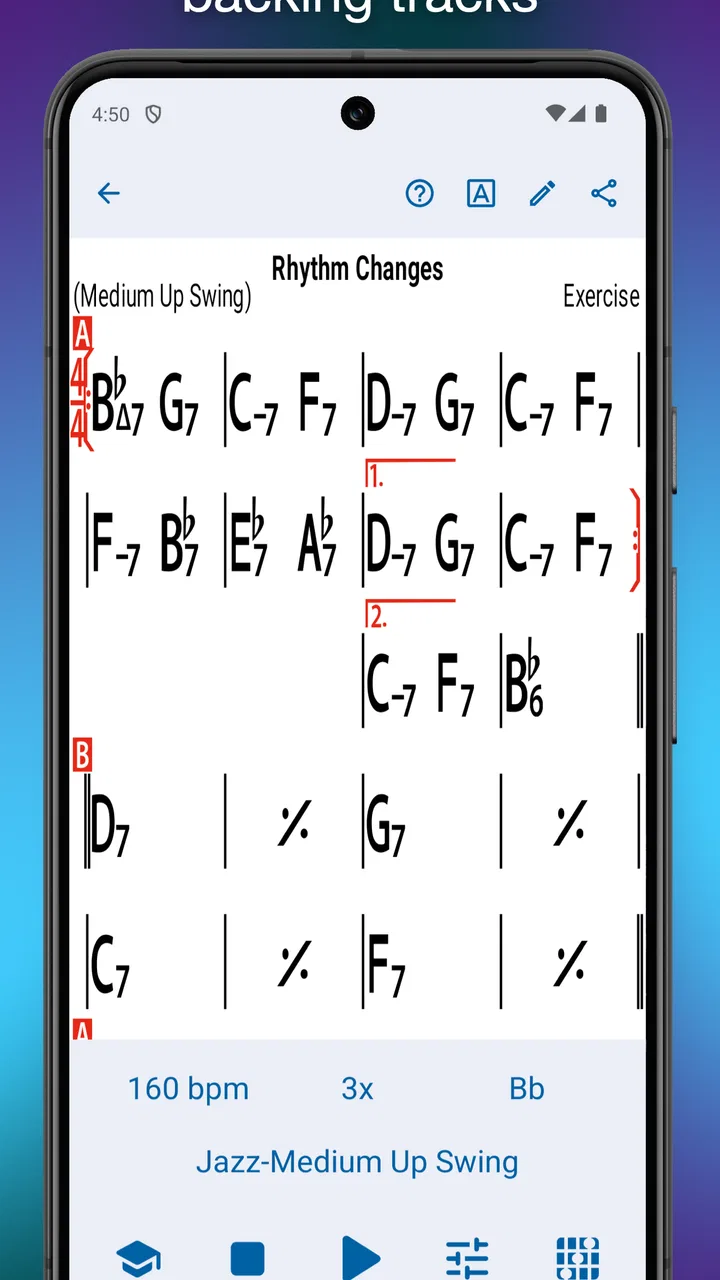
The app has been available since August 3, 2011, and its long presence makes sense once you spend time with it. Its central idea is straightforward: create or open a chord chart, choose how you want it to sound, and play along. That simplicity hides a useful amount of control. You can use it for warming up, learning a progression, testing an arrangement, or keeping a rehearsal moving when there is no full band available.
Its store average is 4.7 from around 19 thousand ratings, and it has passed 500 thousand installs. Those figures do not automatically make an app good, but here they reflect a product with a well-defined audience and a workflow that solves a real problem. The important question is whether that problem is yours. If you need polished finished recordings, this is probably the wrong tool. If you need an adaptable musical partner, it becomes much more convincing.
You May Also Like

 Blood Strike: 2.5 Anniversary
Blood Strike’s Loadouts Turn Every Drop Into a Tactical Gamble
A close look at Blood Strike’s custom loadouts: how fast access to signature weapons reshapes its battle royale rhythm, rewards preparation, and narrows the gap between fights.

 Pandora - Music & Podcasts
Pandora’s Music Is Easy to Start, but Harder to Recover
Pandora’s strength is its low-effort path from a seed to a station. Its weak spot is how much confidence it asks you to place in connection, setup, and quiet recovery.

 8 Ball Pool
 Is Built on Rivalries, Rematches, and Routine
A close look at the rivalries, rematches, shared routines, and unanswered safety questions that turn a quick pool match into a persistent mobile community.

 Samsung Music
’s Quiet Strength Is Playing What You Already Own
Its reach comes less from spectacle than from dependable access to a personal library. That simplicity is both the app’s strongest retention engine and its ceiling.

 AccuWeather: Weather Radar
AccuWeather Review: A Quick, Clear Forecast for Everyday Decisions
For everyday plans, the best forecast is the one you can understand quickly. AccuWeather makes rain timing, radar, and local conditions easy to act on, with a few trade-offs.

 Hill Climb Racing
Why Hill Climb Racing Still Turns Crashes Into One More Run
A tiny car, a bumpy hill and one more upgrade: Hill Climb Racing keeps resurfacing because its simple chaos makes every near-miss feel personal.
More From Our News Desk
View All News


Why the rehearsal workflow works so well
The strongest part of the experience is the distance between an idea and a playable exercise. Instead of searching through unrelated audio tracks, I can start with the harmony itself. That makes the app especially useful for jazz, pop, worship, songwriting, and any practice situation where the chord movement matters as much as the melody.
A chart is not merely something to look at while audio plays underneath. It gives the session a structure. I can concentrate on comping, improvising, hearing changes, or learning where a difficult transition falls. When I repeat a section, the repetition has a musical reason rather than feeling like a generic loop.
The backing-track approach also changes how I practise. A metronome is excellent for time, but it leaves me responsible for imagining the harmonic setting. A normal song recording gives me the setting, but usually fixes the arrangement and makes it difficult to isolate what I am trying to improve. iReal Pro sits between those options: it supplies an accompaniment while leaving room for me to make musical decisions.
That distinction matters for players who are trying to become less dependent on a lead instrument. When I practise with only a click, I can sometimes survive by counting mechanically. With a changing accompaniment, I have to listen for the movement of the harmony and make choices that fit it. The app therefore works best when used actively, not left running in the background.
The songbook concept is another practical strength. A musician can keep material for lessons, rehearsals, gigs, and personal study in one place instead of scattering screenshots, handwritten notes, and audio files across different apps. I find this particularly useful when a practice session has a narrow goal. I can prepare a small group of charts, decide what I want to work on, and move through them without interrupting the session to rebuild the setup.
One less obvious benefit is the way a chart can become a reusable practice template. Rather than treating every song as a fixed object, I can use the same progression to work on different skills. One pass might focus on basic accompaniment, another on guide tones, and another on improvising through the changes. The musical material stays familiar while the exercise changes, which is a much more efficient way to measure improvement than constantly jumping to new songs.
More useful than a fixed recording when you are learning
Compared with a typical backing-track video or a downloaded play-along recording, the app gives me more control over the relationship between the chart and the sound. A fixed recording may be inspiring, but it often forces me to accept its tempo, arrangement, and length. That is fine when I want to perform along with a finished track. It is less helpful when the tempo is too fast, a section needs extra repetition, or I want to simplify the exercise.
Compared with a standard sheet-music reader, the difference is equally important. A reader can display notation beautifully, but it does not necessarily give me a responsive accompaniment. iReal Pro is not trying to replace a complete notation environment. Its value comes from making harmonic practice immediate and interactive.
That makes it a strong companion for a teacher as well. A teacher can use a progression as a shared reference during a lesson, then leave the student with something more useful than a static page. The student can return to the same material alone and hear whether the timing and phrasing remain stable without another person playing every part.
There is also a helpful psychological advantage. Starting practice can be difficult when the task is vague. Opening a chart and pressing play creates a concrete beginning. I still have to do the hard musical work, but the app removes some of the preparation that often becomes an excuse to postpone it.
Small workflows that make a big difference
I would not use the app by simply opening a large library and playing random charts. A better approach is to organize sessions around one musical question. For example, I might choose a few progressions that contain the same troublesome movement and practise them at a comfortable speed. The point is not to collect more material; it is to make each chart answer a specific question.
Another useful habit is to begin slower than feels necessary. A backing track can make a player want to prove that they can keep up, but speed can hide weak anticipation and late chord changes. I prefer to establish clean time first, then raise the challenge only after the progression feels predictable. The app is most valuable when its flexibility is used to expose weaknesses rather than cover them.
I also found that changing the accompaniment style can be more revealing than changing the song. A progression that feels easy with one texture may expose poor time when the rhythmic emphasis changes. This turns a familiar chart into several different exercises without requiring a new piece of music each time.
For singers and melody players, I would prepare the chart before practising the vocal or melodic line. That keeps the session focused on phrasing and pitch instead of navigation. For chordal players, I would do the opposite: keep the accompaniment simple at first and listen carefully to whether my voicings leave space. The same chart can serve different musicians, but it does not automatically tell you what to listen for.
A further trade-off is worth mentioning. Because the app encourages you to work from chord symbols, it can make harmonic understanding feel easier than it really is. A player may become comfortable following the symbols while still struggling to hear the progression without them. I would occasionally practise by looking away from the chart or reducing visual dependence, so the ears remain involved.
Where the experience becomes less comfortable
The main limitation is that this is a musician’s tool, not a polished entertainment product. The interface makes more sense once you understand charts, measures, tempo, and accompaniment choices. A complete beginner may open it expecting an instant collection of songs and instead find a system that asks them to think about how the music is represented.
That learning curve is not necessarily a flaw, but it does affect the recommendation. Someone who wants to press play on familiar commercial songs may find the experience too technical. The app’s strength is control over harmonic practice, and control usually requires a little setup and musical vocabulary.
Editing can also feel like work when the goal is simply to capture a quick idea. Entering a progression carefully is worthwhile if I plan to revisit it, but it is not as immediate as humming a melody into a voice recorder or typing a short note. I would not choose this as my first tool for documenting every spontaneous songwriting thought.
There is another practical limitation in the sound itself: an accompaniment is useful because it supports practice, but it is not the same as rehearsing with human musicians. Real players react to phrasing, leave unexpected space, push time, and communicate through tiny changes that a programmed track cannot fully reproduce. I see the app as preparation for ensemble playing, not a replacement for ensemble playing.
The price also places it in a different category from casual music apps. The listed price is $21.99, with in-app purchases of $6.99 per item. That makes the decision more deliberate, especially for someone who may only practise occasionally. For a committed player, the cost can be easier to justify because the app supports repeated work across many sessions. For a curious beginner who has not yet developed a regular routine, a free metronome, a basic recorder, or a teacher’s existing materials may be a better first step.
The Everyone content rating is reassuring for households and classrooms, but it should not be confused with beginner simplicity. The age classification describes who can use it, while the musical workflow determines who will get the most from it. A young learner can certainly use it with guidance, but the app becomes much more rewarding when someone understands what a chord chart is meant to do.
A realistic everyday session
Imagine I have twenty minutes before work and want to improve my time on a progression that keeps falling apart during rehearsal. I would open the relevant chart, choose a slow starting tempo, and play through it without trying to perform. The first pass would be diagnostic: where do I lose the form, and which change makes me hesitate?
On the second pass, I would simplify my part. If I am playing piano or guitar, that may mean fewer notes and clearer time. If I am playing a single-note instrument, it may mean restricting myself to a small set of target tones. The aim is to make the form feel stable before adding decoration.
Then I would repeat the same material with a different accompaniment setting or a modestly faster tempo. If the problem returns immediately, I would not blame the speed; I would return to the earlier version and isolate the transition. This is where the app is more useful than a passive recording: the practice can be adjusted around the exact weakness rather than forcing me to accept the shape of someone else’s track.
At the end, I would save a note about what improved and what still felt uncertain. The app does not replace disciplined practice, but it makes a short session easier to structure. That matters because consistent, focused sessions usually help more than occasional heroic ones.
Who should choose it, and who should skip it
I think it is a particularly good fit for intermediate players, working musicians, music students, teachers, and songwriters who think in chord progressions. It is also useful for anyone who travels or practises in places where assembling a full group is unrealistic. A tablet or phone can provide a compact rehearsal setup, while the player remains responsible for the musical interpretation.
It suits people who want to transpose an idea mentally, test a progression repeatedly, or prepare for a session without depending on one exact recording. It is also a sensible choice for musicians who have outgrown a metronome but do not need a full digital audio workstation.
I would skip it if my main goal were listening to finished music, recording a polished demo, reading complex notation, or recreating the exact sound of a commercial arrangement. A streaming service is better for listening, a dedicated notation app is better for detailed scores, and a digital audio workstation is better for multitrack production. Those tools solve different problems, and buying this app will not turn it into something it is not.
I would also hesitate to recommend it to someone who dislikes preparation. The best results come from choosing material thoughtfully, setting a useful challenge, and listening critically. If I only want an automatic accompaniment with no interest in the underlying harmony, much of its value will be wasted.
My verdict after using it as a practice partner
My final view is positive, but specific: iReal Pro is a serious practice companion for harmonic musicians, not a general-purpose music app. Its best quality is the way it turns chord charts into repeatable, adjustable musical exercises. That gives me more freedom than a fixed backing track and more musical context than a bare metronome.
The friction is equally clear. It asks the user to understand what they are practising, and its accompaniment cannot reproduce the responsiveness of real players. The setup may feel excessive for a quick idea, and the price requires a genuine intention to use it. Those are meaningful limitations, not minor footnotes.
Still, if I were recommending one tool to a friend who regularly works on chord changes, improvisation, accompaniment, or rehearsal preparation, this would be near the top of my list. I would tell them to approach it as a structured musical workspace. Used that way, iReal Pro earns its place by helping turn spare minutes into focused practice, while leaving the creative and demanding part—the actual musicianship—in the user’s hands.
FAQs for iReal Pro
01What is iReal Pro used for?
iReal Pro is a practice and accompaniment app designed for musicians, singers, music students, and teachers. It can play chord progressions with customizable backing bands, allowing you to rehearse improvisation, rhythm, harmony, and song arrangements. It is useful for jazz, pop, rock, Latin, and other styles, although the quality of your practice depends on how accurately you enter or select the chord chart.
02Does iReal Pro include songs and backing tracks?
iReal Pro includes access to a large community-based library of chord charts covering many musical styles and common standards. The app generates accompaniment from the chord symbols rather than playing original commercial recordings, so you should not expect studio versions of songs or vocal performances. Available charts and their accuracy may vary, and users can also create, edit, import, and share their own arrangements.
03Can I customize the sound, tempo, and musical arrangement in iReal Pro?
Yes. One of iReal Pro’s strongest features is its flexibility. You can change the tempo, key, number of repetitions, song form, and playback style, while selecting different instruments for the backing band. Depending on the arrangement, you can also mute instruments, adjust volume levels, practice with a metronome, and create variations. These controls make the app suitable for slow learning sessions as well as more advanced rehearsal.
04Is iReal Pro suitable for beginners, or is it mainly for experienced musicians?
iReal Pro can be useful at several skill levels, but beginners may need some basic understanding of chords, rhythm, and musical notation to get the most from it. It does not function as a complete step-by-step music course. New players can use simple progressions and slow tempos to practice, while intermediate and advanced musicians will likely appreciate its chord editing, transposition, looping, and improvisation tools much more.
05Does iReal Pro work offline, and is it available on Android and iOS?
After installing the app and downloading or creating the charts you need, iReal Pro can generally be used without a continuous internet connection for playback and practice. Internet access may still be required for obtaining community charts, sharing content, updates, or other online features. The app is available for both Android and iOS, but exact pricing, supported features, and interface details can differ slightly between platforms and may change over time.
Pros
- Accurate chord charts make practicing songs straightforward.
- Supports transposition for different vocal ranges and instruments.
- Backing tracks can be customized by muting individual instruments.
- Large song library offers useful material across many genres.
- Works well for solo practice without requiring other musicians.
Cons
- Some advanced features may take time to learn.
- The interface feels dated compared with newer music apps.
- Song charts may require manual corrections or formatting.
- Full use is more comfortable on a tablet than a phone.
- It is less useful for players seeking realistic vocal melodies.

iReal Pro
Gallery